Every platform team knows the moment: you audit your container fleet and find seventeen different base images, each chosen by a different squad, each carrying hundreds of unpatched CVEs. Hardened container images fix that problem at the source, but rolling them out across dozens of teams is where most programs quietly stall.
This guide covers how to do it right, what breaks, and what to look for when evaluating tools that claim to help.
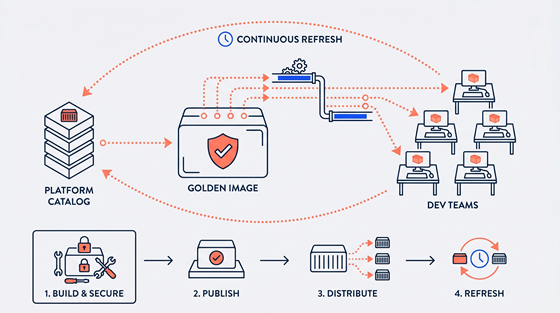
Container image hardening pipeline showing golden image catalog with near-zero CVE baseline, scanner beam, and labeled OS family stacks on dark navy background
How to Build and Roll Out a Golden-Image Program
A golden-image program gives developers a curated, pre-approved set of base images they can pull without worrying about container security. Done well, it removes per-team security debt and gives your platform team a single place to own compliance.
Step 1: Audit what you have. Pull a list of every base image in production. Group by OS family (Alpine, Debian, UBI, Ubuntu LTS). Count how many variants exist per family. That number is your starting attack surface and your baseline for measuring progress.
Step 2: Define your golden-image catalog. Pick one image per OS family, per major version. Document why each was chosen. Fewer images mean fewer patch surfaces, and fewer patch surfaces mean fewer incidents. Treat this catalog as a product, not a spreadsheet.
Step 3: Automate drift detection. A golden image is only as good as its freshness. Wire your CI pipeline to reject base images older than a defined threshold (30 days is a common starting point). Without this gate, hardened images drift back into vulnerability within weeks.
Step 4: Reduce the hardened container images attack surface before publishing. Strip unused packages, tools, and OS components from each image. An image that ships with a shell and a package manager has an attack surface that dwarfs one that ships with only the runtime binaries the app actually needs.
Step 5: Give teams a migration path, not a mandate. Provide drop-in replacements that match the FROM line in existing Dockerfiles. Pair that with a short runbook for common compatibility issues. Adoption follows friction, so reduce friction first.
What Platform Teams Get Wrong
Most golden-image programs fail the same way: they launch well and then stall.
The most common mistake is treating the catalog as a one-time project. Teams harden images at launch, publish them, and move on. Six months later those images are carrying dozens of new CVEs, and no one owns the remediation cycle. Hardening is not a state. It is a process.
The second mistake is ignoring developer buy-in. If developers have to refactor Dockerfiles to adopt a hardened base, many will not. Friction kills adoption faster than any policy can enforce compliance.
The third mistake is building the maintenance pipeline by hand. Tracking CVE advisories, rebuilding images, testing compatibility, and publishing updates is a full-time job that scales linearly with catalog size. Most platform teams underestimate that cost until they are already carrying it.
“A hardened image that no one updates is eventually just a slow-moving vulnerability. The catalog is only secure if the refresh cycle is automated and continuous.”
Five-step golden image program winding roadmap: Audit, Golden Catalog, Automate Drift, Reduce Attack Surface, Migration Path — with three common failure warning markers
Criteria Checklist for Evaluating Golden-Image Solutions
Near-Zero CVE Baseline
Your chosen images should start with a minimal, curated package set that eliminates known vulnerabilities before your teams ever pull them. Look for solutions that publish CVE counts per image and maintain them, not just report them at build time.
Continuous Automated Refresh
Images must be rebuilt and re-published on a short cycle (24 hours is the current standard) to absorb upstream patches. Manual refresh schedules introduce gaps that attackers exploit.
Attack Surface Reduction
Effective solutions remove unused OS components, shells, and package managers from the final image. Aim for up to 90% attack-surface reduction versus the upstream base. That number is measurable. Ask vendors to show it.
Drop-In Compatibility
A hardened image that requires code changes to adopt will be ignored by busy dev teams. Solutions should support drop-in replacement of popular upstream bases (Alpine, Debian, UBI, Ubuntu LTS) with no Dockerfile refactoring.
Runtime Profiling
Static hardening catches what is present at build time. Runtime profiling catches what is actually used during execution. Tools that can generate a runtime bill of materials (RBOM) let you harden further without guessing.
Cost of Manual Maintenance
If a solution requires your engineers to track CVE advisories, rebuild images, and manage catalog updates by hand, price that labor. At catalog scale, it is rarely cheaper than a managed alternative.
Frequently Asked Questions
How many base images should a platform team maintain?
Start with one image per OS family per major version. Most teams need four to six images to cover their full fleet. Every additional image beyond that adds a maintenance burden and a potential drift vector. Trim ruthlessly and document every exception.
Can we harden images without changing developer workflows?
Yes, if you choose drop-in replacements and enforce adoption at the CI level rather than the Dockerfile level. A registry policy that redirects pulls from the upstream base to your hardened equivalent means developers do not need to touch anything. The gate enforces the standard.
What tools can help automate CVE remediation at scale?
Managed catalogs offload the hardest part of this problem. RapidFort maintains a catalog of over 25,000 curated near-zero-CVE images that are continuously refreshed every 24 hours, covering Alpine, Debian, UBI, and Ubuntu LTS, with no code or pipeline changes required on your end.
How do we measure whether our hardening program is working?
Track three numbers: total CVE count across your fleet, mean age of base images in production, and percentage of workloads using approved golden images. All three should trend in the same direction. If any one of them stagnates, the program has a gap.
The Cost of Not Acting
Every week you delay standardizing your base images, new CVEs land on images your teams are actively shipping. The patch-and-rebuild cycle does not get easier as your catalog grows. It gets harder, slower, and more expensive.
Platform teams that build a solid golden-image program early spend less time on emergency patches and more time shipping features. The inverse is also true: teams that skip it end up running an unplanned remediation sprint every time a critical vulnerability drops.
The real risk is not the CVEs you know about. It is the ones sitting in unmaintained images that no one is watching. A continuous, automated hardening program eliminates that blind spot. A manual one creates it.
Start small. Pick one OS family, harden it, automate the refresh, and give teams a clean migration path. Then expand from there. The catalog does not need to be perfect on day one. It needs to be better than what every squad is running today, and it needs to stay that way.